Session name:
The name of the session variable where the extension save the text of the image created. To be safe the text cannot ne put inside the page form so the extension generate a random text and save the value in a session. When you must validate the form you must compare the value of this session with the value of the form field.
Image:
The image you want apply the extension. You must insert a void image tag in the page and give the name propertie.
Is not necessary add the Src, width and height properties.
Like this example
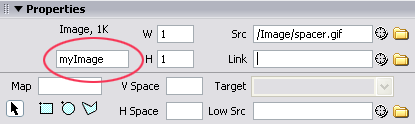
Image width:
The width of the generated image
Image height
The height of the generated image
Code length:
The length of the random text in number of characters
Chars type:
Choose which type of characters the extension use to generate the random text.
Available chars type:
- AlphaNumeric Uppercase
- AlphaNumeric Lowercase
- Alphabetic Uppercase
- Alphabetic Lowercase
Brush type:
The type of background color between: Solid, Linear gradient and Hatch
Distort image:
Disturb image:
Disturb level:
The disturb level. Hight value to make more difficult for text recognize application
Font list:
Specify a list of font. The extension generate the random text with this font and get random the font to use so each type the text is created with a different font
Color panel:
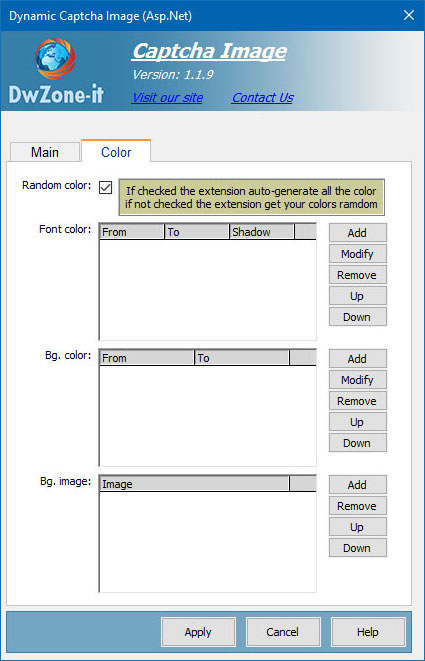
Random color:
If checked the extension generate all the colour for the font and for the background random but if you want create your colour setup you can uncheck and create a list of color for the font and for the background. For the background you can also define a list of image. If the list of images is created the extension use them instead of the color.
Font color:
Define a list of font color conbination. The extension get the color conbination random
The font color you can setp are: FromColor, ToColor and shadow color.
The fromColor and ToColor are used to create the Linear gradient and Hatch Brush, if select the solid brush only the FromColor is used.
Bg color:
Define a list of background color conbination. The extension get the background color conbination random
The font color you can setp are: FromColor, ToColor
The fromColor and ToColor are used to create the Linear gradient and Hatch Brush, if select the solid brush only the FromColor is used.
Bg Image:
Define a list of background images.
The extension get the background image random
