This panel define the detail data grid parameters. To enabled a master/detail grid you must check the checkbox in the left side.
This will enable the button "Configure the detail grid".
After you check the checkbox click on the "Configure the detail grid" butto to open a new panel where setup the parameters for the detail grid.
This is the main panel to setup the detail grid parameters, for the single parameters refer to the
main panel of the data grid page
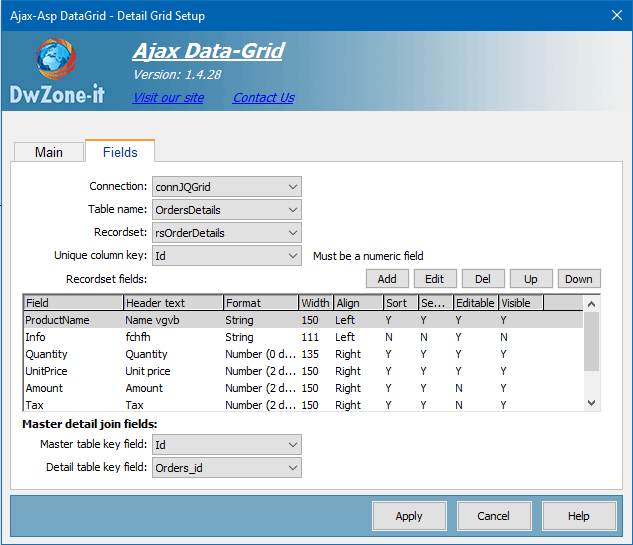
This is the panel to setup the detail grid columns, for the single parameters refer to the
fields panel of the data grid page.
To populate the detail grid you must have a secondary recordset that has the key reference to the main recordset, where for each record in the main recordset you have one or more records in the secondary recordset like this example:
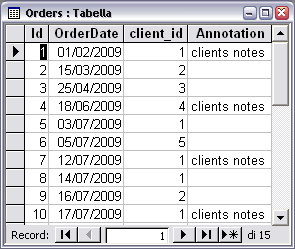
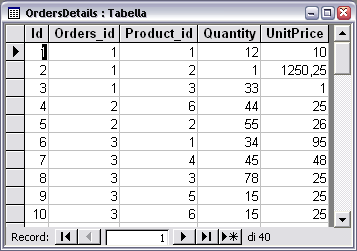
In this example you can see 2 tables, Orders and OrdersDetails. Orders is the master table and this record will be show in the master data grid and OrdersDetail is the detail table and this records will be show in the detail grid. In this example the Master table key field will be the ID field of the OrdersDetail table and the Detail table key field will be the Orders_Id field of the OrdersDetail table. Orders_Id field of the OrdersDetail table is the field that join the OrdersDetails record to the Orders records.
For example the first 3 record of the OrdersDetails table (that has Orders_Id=1) refer to the first record of the Orders table (that has Id=1).
When you setup a master/detail DataGrid the extension put the reference code for the 2 DataGrid inside a table with 2 rows and setup a default style class that you can overwrite to apply your style for the 2 grids, the style class for the Master Grid is "
dwzCellMasterGrid" and the style class for the Detail Grid is "
dwzCellDetailGrid" so you create your own style to define space and alignment between the 2 grids.
<table border="0" cellpadding="0" cellspacing="0">
<tr>
<td class="dwzCellMasterGrid">
<Master table position > </td>
</tr>
<tr>
<td class="dwzCellDetailGrid" >
<Detail table position >
</td>
</tr>
</table> For example:
<style type="text/css">
.dwzCellMasterGrid{
padding-bottom:15px;
}
.dwzCellDetailGrid{
padding-top:15px;
}
</style>
