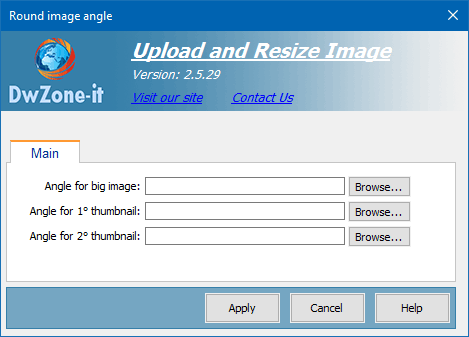
This behavior round the 4 corner of the images after the upload and the resize process are completed.
The upload process, after is completed, verify if this behavior is in the page and if the behavior is find round the 4 corner of the uploaded images.
If one or more image angle are void the behavior skip the image and don't round the corner of this image. So you can define if round the corner of all the images or if skip one of them.
The corner you must insert is the top-left corner image, the behavior will turn the image to create the other 3 corner top-right / bottom-right / bottom-left.
The corner image must be on the site, is not uploaded during the upload process. You must put the corner image in the site.
Click on the browse button to select the image you want use like corner
This behavior to work need the Asp.Net Framework installed on the server
Angle for big image:
The image you want use to round the 4 corner of the master image
Angle for 1° thumb:
The image you want use to round the 4 corner of the 1° thumbnail
Angle for 2 ° thumb:
The image you want use to round the 4 corner of the 2 ° thumbnail
This is an example of what you can do with this behavior.
Original image
Corner image
Result image

Warning! The BgColor of this
table cell is grey only to display
the image that is a white corner
with a trasparent part and
the black border is only to
define exactly the image I use
to obtain the result image |
Original image
Corner image
Result image

Warning! The BgColor of this
table cell is grey only to display
the image that is a white corner
with a trasparent part and
the black border is only to
define exactly the image I use
to obtain the result image |
