This panel define the element of the header of your RssFeed xml file.
Encoding:
The encoding of your RssFeed file like:
<?xml version="1.0" encoding="utf-8" ?>
Create on:
On Page Load
on the OnLoad event of the page
Post variable
when the request.form variable exists
Get variable
when the request.querystring variable exists
Request variable
when the generic request variable exists
Session variable
when the session variable exists
Application variable
when the Application variable exists
Cookie variable
when the request.Cookie variable exists
With this variuos event you can define when the RssFeed is created, but the most simple method is create a link in your pages that point to a page where you insert only this extension and that create the RssFeed on the OnLoad event so when your user click on the link a new browser window is open and the RssFeed is created and displayed in the browser window.
Export method:
the method to display the Rss Feed, can be:
Browser: display the RssFeed inside the browser window
File: force the download of the RssFeed file and display the SaveAs popup window, so the user can save the RssFeed file on it's Pc.
File name:
The file name in case you setup the Export Method to file
Title:
The Title element of the RssFeed header, can also be dynamic from a recordset
Link:
The Link element of the RssFeed header, can also be dynamic from a recordset
Description:
The Description element of the RssFeed header, can also be dynamic from a recordset
Pub date:
If checked insert the PubDate element in the format:
<pubDate>SUN, 1 JAN 2006 00:00:00 +0100</pubDate>
Time zone:
If you insert the PubDate you must define the timezone of the date because this element of the RssFeed need the TimeZone to define the hours that depend on the time zone where you are.
Custom tag:
If you need you can define more custom tag that will be insert in the header of the RssFeed file. For each CustomTab you must define the label, the value and the type of the tag. The label is a string that will identify the tag like:
<yourCustomTagLabel> The value is the text you want insert inside the tag.
The type is the type of tag the extension will insert.
The 2 type are SingleLine or MultiLine.
SingleLine tag example:
<yourCustomTagLabel>Your value here </yourCustomTagLabel>
MultiLine example:
<yourCustomTagLabel><![CDATA[ Your value here ]]></yourCustomTagLabel>
A multiline tag is a tag that can contain also special char like the Html tag and can contain more lines of text.
Add Info
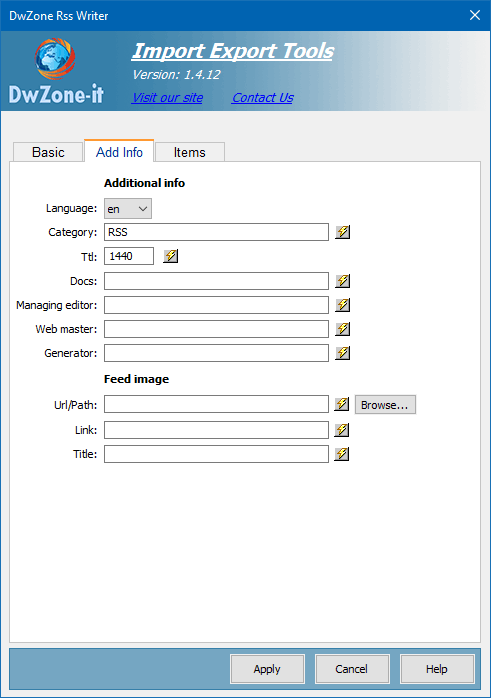
A list of additional info you can add to the header of the RssFeed file
ttl:
A numeric value that is the time
Language:
Category:
Docs:
Managing editor:
Web master:
Generator:
This is a list of extra tag you can add to your RssFeed file, this tag are insert in the header of the Rss Feed
Feed Image:
Define the Image tag for the RssFeed header like:
<image>
<title>http://www.DwZone-it.com/</title>
<url>http://www.DwZone-it.com/FeedImage.gif</url>
<link>http://www.DwZone-it.com/</link>
</image>
Items:
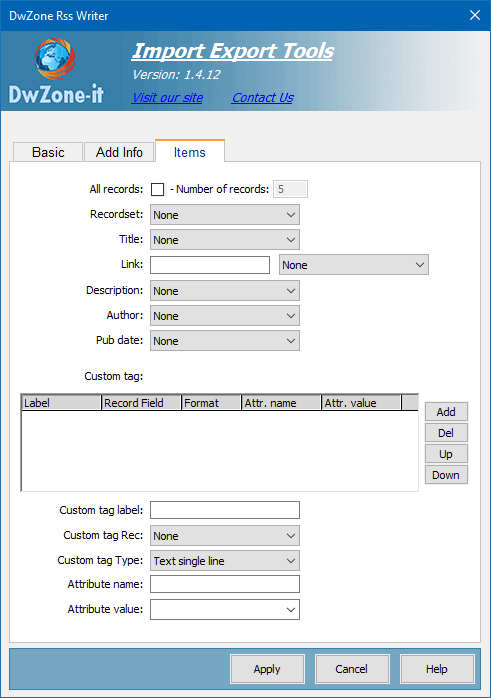
Define the items of the RssFeed file
All records:
If checked the extension create the RssFeed with all the records in the recordset, otherwise you can specify a number of record, this can be used to test the page and create a small Rss Feed file only for test or to limit the number of element in the RssFeed file.
Recordset:
In the options Recordset pop-up menu, select the recordset you want to use as a content source
Title:
The recordset field where get the Title element of the item
Link:
The recordset field where get the Link element of the item
Description:
The recordset field where get the Description element of the item
Author:
The recordset field where get the Author element of the item
PubDate:
The recordset field where get the PubDate element of the item. The date will be in the format: <pubDate>SUN, 1 JAN 2006 00:00:00 +0100</pubDate>
The recordset must return a valid date.
Custom tag:
If you need you can define more custom tag that will be insert in each item of the RssFeed file. For each CustomTab you must define the label, the tag rec and the type of the tag. The label is a string that will identify the tag like:
<yourCustomTagLabel> The tag rec is the recordset field that contain the text you want insert inside the tag. The type is the type of tag the extension will insert.
The 2 type are SingleLine or MultiLine. SingleLine tag example:
<yourCustomTagLabel>Your value here </yourCustomTagLabel> MultiLine example:
<yourCustomTagLabel><![CDATA[ Your value here ]]></yourCustomTagLabel> A multiline tag is a tag that can contain also special char like the Html tag and can contain more lines of text.
