Encoding:
The encoding of your XmlFile file like:
<?xml version="1.0" encoding="utf-8" ?>
Create on:
On Page Load
on the OnLoad event of the page
Post variable
when the request.form variable exists
Get variable
when the request.querystring variable exists
Request variable
when the generic request variable exists
Session variable
when the session variable exists
Application variable
when the Application variable exists
Cookie variable
when the request.Cookie variable exists
With this variuos event you can define when the RssFeed is created, but the most simple method is create a link in your pages that point to a page where you insert only this extension and that create the RssFeed on the OnLoad event so when your user click on the link a new browser window is open and the RssFeed is created and displayed in the browser window.
Export method:
the method to display the Rss Feed, can be:
Browser: display the RssFeed inside the browser window
File: force the download of the RssFeed file and display the SaveAs popup window, so the user can save the RssFeed file on it's Pc.
File name:
The file name in case you setup the Export Method to file
All records:
If checked the extension create the RssFeed with all the records in the recordset, otherwise you can specify a number of record, this can be used to test the page and create a small Rss Feed file only for test or to limit the number of element in the RssFeed file.
Export as:
The Xml has 2 method to define value inside a node.
The Node Value and the Node Attribute.
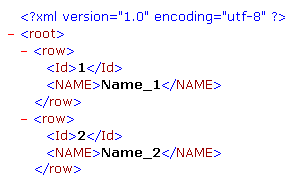
This is an example of Node Value
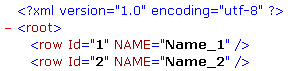
This is an example of Node Attribute
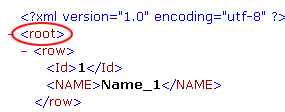
Xml root label:
The label of the first level node, like:
Xml row label:
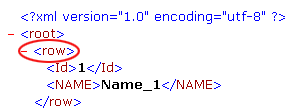
The label of the node that will contain the data, like:
Recordset panel
Recordset:
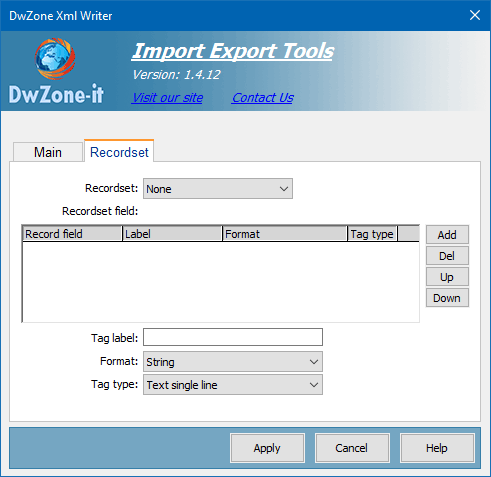
In the options Recordset pop-up menu, select the recordset you want to use as a content source.
Recordset fields:
After you select a recordset this element display the list of recordset field with a predefined label, format and tag type.
It's possible personalize all this parameters like you need, you must select a record field in this element and in the 3 element belowe you can modify the label, the format and the tag type for each record field.
With the 4 button in the right you can remove (Del button) the field you don't want export or add (Add button) a field you have deleted and setup the order position for each field with the button Up and Down button.
Tag label :
The label for the Tag or for the Attribute that will contain the field data.
Format:
The format of the exported data.
The available format are:
String
Number (Default)
Number (0 decimal)
Number (1 decimal)
Number (2 decimal)
Number (3 decimal)
Number (4 decimal)
Date DD.MM.YYYY
Date DD.MM.YYYY h:m
Date DD.MM.YYYY h:m:s
Date MM.DD.YYYY
Date MM.DD.YYYY h:m
Date MM.DD.YYYY h:m:s
Date YYYY.MM.DD
Date YYYY.MM.DD h:m
Date YYYY.MM.DD h:m:s
Date DD/MM/YYYY
Date DD/MM/YYYY h:m
Date DD/MM/YYYY h:m:s
Date MM/DD/YYYY
Date MM/DD/YYYY h:m
Date MM/DD/YYYY h:m:s
Date YYYY/MM/DD
Date YYYY/MM/DD h:m
Date YYYY/MM/DD h:m:s
Date DD-MM-YYYY
Date DD-MM-YYYY h:m
Date DD-MM-YYYY h:m:s
Date MM-DD-YYYY
Date MM-DD-YYYY h:m
Date MM-DD-YYYY h:m:s
Date YYYY-MM-DD
Date YYYY-MM-DD h:m
Date YYYY-MM-DD h:m:s
Boolean (true/false)
Boolean (1/0)
Boolean (-1/0)
Boolean (yes/no)
Boolean (Y/N)
Tag type:
This option is available only for Nodes export method, the attribute export method have only the SingleLine tag type available.
There are 2 type of tag. The SimpleLine and the MultiLine tag.
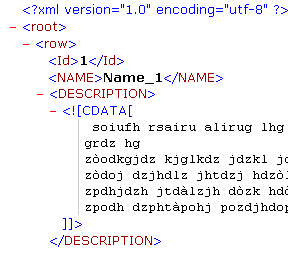
In this image you can see the 2 type of tag, the DESCRIPTION is a MultiLine tag and the NAME is a SingleLine Tag.
A MultiLine tag can contain also special char like the Html tag and text with LineFeed.